


A username and password are not always enough to submit an online application. A public authority may also need electronic confirmation of your identity. In Germany, three separate tools work together: your BundID account, the online ID function of your document and AusweisApp. The government’s digital wallet, d-you, is a separate project with a launch still planned for the future.
Start by finding the service and checking its requirements. Prepare a suitable document and sign-in method, verify your identity, then return to the application and submit it. Installing an app or opening an account does not mean that you have applied for a benefit, registered your address or extended a residence permit.
- What each name means
- First find the service for your location
- Which document can you use?
- Prepare your document, PIN and device
- Create BundID or use your existing account
- Verify your identity, then submit the application
- Troubleshooting common problems
- What is known about d-you?
- Frequently asked questions
- Help with public procedures after moving
What each name means
BundID is the federal user account for participating online public services. It provides sign-in and identity verification, allows stored details to be used and has a mailbox for messages where supported. The actual service will often be on the responsible authority’s portal rather than inside BundID. Official BundID website and Federal Employment Agency explanation.
eID, or Online-Ausweisfunktion, is an electronic identification function. In Germany, it can be available on a Personalausweis, an electronic residence permit (eAT), or an eID-Karte for eligible EU/EEA nationals. The eID function and the specific document called an eID-Karte are not the same thing. AusweisApp explanation.
AusweisApp connects the chip in your document to an online service and enables encrypted data exchange. It does not issue residence permits, decide applications or replace an authority’s website. What the app does.
d-you is the name of Germany’s planned government EUDI Wallet. Its announced launch date is 2 January 2027. It is a future service, not a reason to postpone an application that is due now. Official announcement of 15 September 2026.
Unsure which authority or procedure you need after moving? Contact FIRMDER to discuss your situation and documents. You do not need to share passwords, PINs or access to your personal account with a consultant.
First find the service for your location
Start on the responsible authority’s official website or the Bundesportal. Select the service and location. Electronic identification follows shared principles, but the availability of an online form, eligibility and subsequent steps depend on the particular procedure.
Before registering an account, check:
- Does the authority cover your address or type of case?
- Is the online service available for your circumstances?
- Which identity verification methods does it accept?
- Can you finish everything online, or will an appointment, an original document or further evidence still be required?
This distinction matters for Anmeldung, Germany’s address registration. Being technically able to authenticate with an eAT does not establish that a particular online registration service accepts that document or supports a first move to Germany from abroad. Our separate guide covers your first home in Germany and Anmeldung. This article focuses on access to digital services.
Which document can you use?
Spätaussiedler and other German citizens
For the German online ID process, use a suitable Personalausweis with its online function enabled. An ordinary passport is not an equivalent electronic substitute in this process. Check the particular document, its validity and its eID capability, rather than assuming that any German document will work.
An Aufnahmebescheid issued in the ethnic German resettlement procedure is a paper document, not an electronic ID card. Until you receive a suitable card, ask the authority about another accepted way to proceed. Do not delay a required action solely because digital access is not yet available. Section 18 of the Identity Card Act.
Foreign nationals with an electronic residence permit
An eAT can provide electronic identification under the applicable conditions. This function does not extend the residence permit or change the activities you are allowed to undertake. A visa sticker in a passport or a temporary paper confirmation is not the same as an eAT card. Section 78 of the Residence Act.
Members of one family may have different citizenships, residence rights and documents. Check each person’s own status and card. A single instruction about extending a residence permit will not apply to every Spätaussiedler and accompanying relative.
Nationals of another EU or EEA country
The eID-Karte is available from age 16 to eligible EU/EEA nationals who are not German citizens. It is for electronic identification, not border crossings, and does not replace a passport or national identity card. Federal Foreign Office guidance.
Some services also accept European electronic identification through a separate sign-in option. Availability depends on the country, the identification method and the receiving service. Do not assume that every identity card issued in an EU country works in the same way.
Prepare your document, PIN and device
For the standard process, you need an enabled online ID function, your six-digit PIN, AusweisApp, and a compatible NFC smartphone or supported USB card reader. The eID-Karte’s function is enabled automatically. For other suitable documents, you can check the function using “Gerät und Ausweis prüfen” in the mobile app. Official requirements.
If you only have the initial five-digit code from your PIN letter and have not set a personal PIN, complete the initial setup first. Neither the document number nor the CAN printed on the card replaces the PIN. Your card PIN, BundID password and phone unlock code serve different purposes.
If you have forgotten the PIN or the function is disabled, contact the competent identity document authority, or Ausweisbehörde. The responsible office may differ by document. Use the official authority search or call 115 to find out which office handles your card. Do not rely on old instructions for ordering a new PIN by post. Current activation and PIN guidance.
Download AusweisApp from the official source
Open the official download page and choose your operating system there. This helps avoid similarly named products in advertisements. On 3 November 2026, the page lists Android 9.0 or later and iOS 17.0 or later for smartphones. Device and NFC compatibility also matter: the operating system version alone is not enough. Check the current requirements before installing.
Choose the arrangement that suits you:
- Smartphone only: Open the service in the phone’s browser and read the card using its NFC function.
- Computer and smartphone: Fill out the form on the larger screen and use the phone as a reader. Install AusweisApp on both devices.
- Computer and USB reader: Use a supported reader listed by the software provider.
The official usage guide explains these options. Check your existing phone before buying a separate card reader.
Create BundID or use your existing account
Open id.bund.de directly or follow the sign-in route from the official service. If you already have an account, use it or the intended account recovery process. Creating another account after each error makes it harder to track messages and applications.
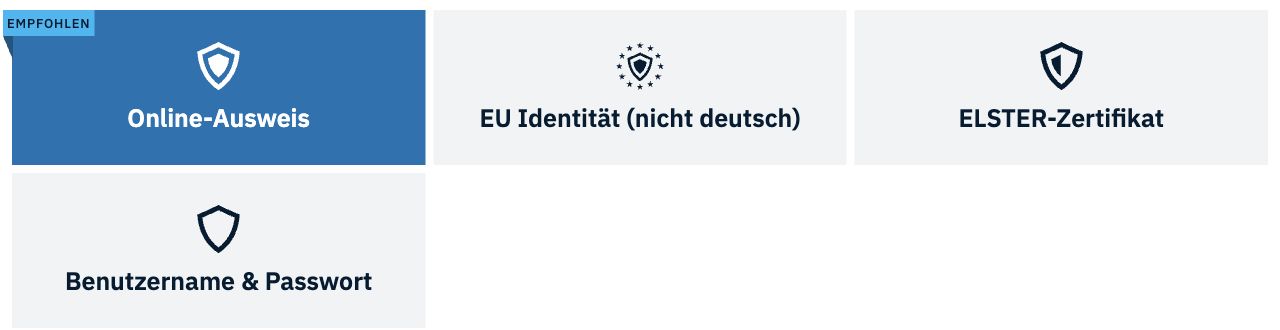
For a new account, choose “Konto erstellen”. Four routes are available: username and password, online ID, ELSTER access and European identity. The last three also create a username and password. You can add further access methods later. BundID FAQ.
To use a suitable electronic ID card, choose “Online-Ausweis”. Follow the steps in AusweisApp, check your details, supply the required information and verify your email address. Individual button labels may change. The AusweisApp guide to BundID demonstrates registration and subsequent access to Federal Employment Agency services.
A password login does not unlock every operation. A service may require a particular Vertrauensniveau, or level of assurance. ELSTER generally provides “substanziell”; the online ID provides “hoch”. European identification methods can support different levels. The service tells you which level is required. Federal Employment Agency explanation.
A request for a higher level therefore does not necessarily mean the account is broken. Check the method used for the current session. The Employment Agency’s rules on session length and available functions should not be applied to every other public portal.
Verify your identity, then submit the application
Open the required service, select BundID and choose online ID. On a computer, start AusweisApp beforehand. The website passes a request to the app. When prompted, position the card at the phone’s NFC antenna or use your reader, then follow the instructions. Official identification procedure.
Before authorising the transfer, read who is requesting which information. AusweisApp shows the recipient’s authorisation certificate and the data requested. If the recipient does not match the service you opened, stop and check the website. Entering your PIN authorises data transfer; you should not disclose it to someone by phone or message. AusweisApp security features.
After identification, return to the authority’s portal and check that the correct procedure has opened. You will usually still need to complete the form, attach documents, review the details and separately submit the application. Save the available submission confirmation, reference number and a copy of what you sent. A saved draft is not a completed submission.
For example, BundID provides access to a ZAB account, but the documents and purpose of a Statement of Comparability are assessed separately. Successful sign-in does not mean your qualification has received a positive assessment. See our guide to anabin, ZAB and DAB and the official ZAB application procedure.
If the difficulty concerns the right application or evidence rather than your phone, discuss your situation with FIRMDER. The service name, responsible authority and a description of the problem are enough for an initial discussion; do not include secret codes. The authority decides the application.
Troubleshooting common problems
The phone cannot read the card
Check compatibility and NFC, remove an obstructing case if necessary and adjust the card’s position relative to the antenna. Keep it still until reading finishes. Do not present several cards at once. Restarting the app or phone may help if it has frozen. Official usage advice.
The app does not return to the correct browser session
On a computer, check that AusweisApp is running. Use the same normal browser throughout. Returning to a different browser or switching between a private window and a normal one may interrupt the session. Do not disable your computer’s security altogether or install unknown software suggested by a random website. Browser troubleshooting FAQ.
The PIN is rejected
Do not keep guessing: repeated incorrect attempts can block it. Contact the competent document authority if you do not know the PIN, or official support for technical problems. Do not send your PIN letter, PIN or PUK to a chat for someone to “check”. PIN troubleshooting.
The application is unavailable after successful sign-in
Check the service’s eligible users, the sign-in method and the responsible authority. Identity assurance and eligibility for a particular service are separate requirements. Ask the relevant technical support about a card or reading problem; ask the authority receiving the application about procedural requirements.
If a deadline is approaching, do not wait silently for the service to recover. Record the error without unnecessary personal data and ask the authority which alternative submission method is accepted. A screenshot of an error does not, by itself, preserve a deadline. An ordinary email does not always replace the required form.
What is known about d-you?
The name d-you was presented on 9 September 2026, with the official news item published on 15 September. Germany’s government EUDI Wallet is intended for digital identification and credentials. Use is planned to be voluntary and free, with users controlling which information they share. Official announcement.
The planned launch is 2 January 2027, initially with a first set of applications and credentials, followed by further functionality. This does not mean that every document, banking service or municipal process is already available. Before using it, check the actual release and supported functions on the official project website.
The government has also reported on a bill concerning the legal framework for digital identity. Cabinet approval of a bill is not proof that the law has entered into force. For applications today, use the procedures currently offered by the responsible authority. Federal Government announcement.
Do not wait for d-you if you need to contact an authority now. Do not install an alleged early version from an unverified link, or treat the future app as a replacement for your passport, residence rights or a citizenship decision.
Frequently asked questions
It is not a universal requirement for all residents. You need it where the chosen online service uses that access method. Check the conditions and alternatives for your particular procedure.
Yes. An eAT or eID-Karte is available for the relevant groups. However, an individual public service may impose its own conditions concerning status or eligible applicants.
For another sign-in using online ID, you still need the app and a suitable document. Having an account does not replace the chosen means of identification.
No. Check in the actual service whether submission is complete and whether a confirmation or reference number is available. Also monitor the designated channel for further correspondence.
Do not share PINs, passwords or recovery secrets. Separate advice on the application from your personal identification. Where representation is permitted, arrange it under the procedure’s rules rather than handing over your digital identity.
At the check on 3 November 2026, the official announcement still gives a planned launch of 2 January 2027. Use the authority’s currently available methods and check the actual conditions and functions once the wallet launches.
Help with public procedures after moving
List your task, the responsible authority, any deadline, the appropriate document and the submission method. Prepare digital access in advance, while also checking the substance of your application.
Contact FIRMDER if you need help organising the next steps after moving and preparing for contact with German authorities. We can discuss your circumstances and the available scope of support.
FIRMDER is a private consultancy. We do not issue government documents or guarantee an authority’s decision. This article provides general information, not an individual determination of your rights.